sonn GitHub

the open audioserver

One server. Every room. Your speakers.

sonn collects your music — local library, Spotify, Apple Music, Tidal, radio, even the turntable — and plays it in sync on the speakers you already own, over almost any protocol they speak. Or skip the rooms entirely and serve your content to every app in the house.

Get started

open source apache-2.0 self-hosted 4.0 beta

one server, two shapes

Content server, or whole-home system. Or both.

A fresh install starts with no zones and nothing shared. What you switch on decides what it becomes — and you can change your mind later without starting over.

01 / content only

Serve your music to everything

Point your library, streaming accounts and radio at sonn, switch on how you want to reach it, and every app and device in the house can browse and play — no rooms to configure, nothing to manage per device.

  • DLNA / UPnP MediaServer — smart TVs, receivers, network speakers
  • Subsonic API — Symfonium, Amperfy, DSub and friends
  • Network drive (WebDAV) — drag albums in with Finder or Explorer
  • Built-in web player, from any browser on the network

Streaming services included — on devices that have no support for them of their own. A DLNA TV has no Apple Music or Tidal app, yet it browses and plays your accounts straight from the couch, because sonn serves them like any other content.

02 / multiroom

Or own the rooms yourself

Add fixed zones — up to 24, one per room — and sonn drives the speakers directly: named rooms, synchronized groups, one place to control the whole house.

  • Central control from the web player, Admin UI or a Loxone app
  • Group any rooms to play in perfect sync
  • Per-zone equalizer, volume limits, favorites and recents
  • Amp power switching over GPIO or USB relay, per zone or shared

With the Loxone integration on, the Miniserver supplies the zones — sonn behaves as a full Loxone Audio Server.

the signal path

Your file, unchanged, at the speaker.

sonn is built around one idea: the audio that leaves your library should reach the player exactly as it was recorded. Every stage that could touch it is visible per zone — and the server does none of them unless something makes that impossible. Try it:

source

output

processing

source

Library

FLAC · 24-bit / 192 kHz

resampler

SoX · 28-bit

bypassed

equalizer

10-band

bypassed

volume

On the device

never in the stream

sendspin

USB DAC

24-bit / 192 kHz

bit-perfect

Sendspin negotiates the format per track, so the server follows the source: the file's own samples travel over the network and the DAC clocks them at the rate they were recorded at. Nothing in the chain gets a vote.

The web player shows this technical view for every zone, live: the source format, every stage that touched the audio, and the verdict. Bit-perfect, untouched, or altered — with the reason. And if you just want music: use whatever output you already have. All of it works, all of it sounds good, and none of it needs a thought about sample rates.

content

Everything you listen to, in one place.

Every source is available to every consumer of the server — the web player, Loxone, DLNA devices and Subsonic apps alike. Configure it once, reach it from everywhere.

Local library

Folders and network shares, indexed by tags into albums, artists and tracks — with cover art, and artist pictures fetched automatically.

  • Incremental indexing — a dropped file just appears
  • Add music by drag-and-drop, or over the network drive
  • Browse, search and manage from the Admin UI

Streaming services

Spotify, Apple Music, Tidal, Deezer, YouTube Music, YouTube, SoundCloud — and Music Assistant as a source, exposing its own providers.

  • Several accounts of one service can coexist
  • Each account is its own browsable service
  • Served on to Loxone, DLNA and Subsonic too

Radio

The TuneIn directory, Radio Paradise and your own custom streams — with artwork, through any zone and any app in the house.

  • TuneIn presets, and search across the full directory
  • Custom streams, with your own cover art
  • TTS and alert sounds, Loxone-native when paired

Line-in

The turntable or CD player, through any zone — captured by the line-in bridge, or by Sendspin's source role: on a dedicated endpoint, or riding along with a player.

  • Optional Shazam track recognition
  • Play, pause and skip are forwarded to the device — when it can be driven over the network
  • B&O Masterlink gives full control — play, pause, next, previous, and a Beosound 9000 even changes discs on command

the web player

The whole house, from any browser.

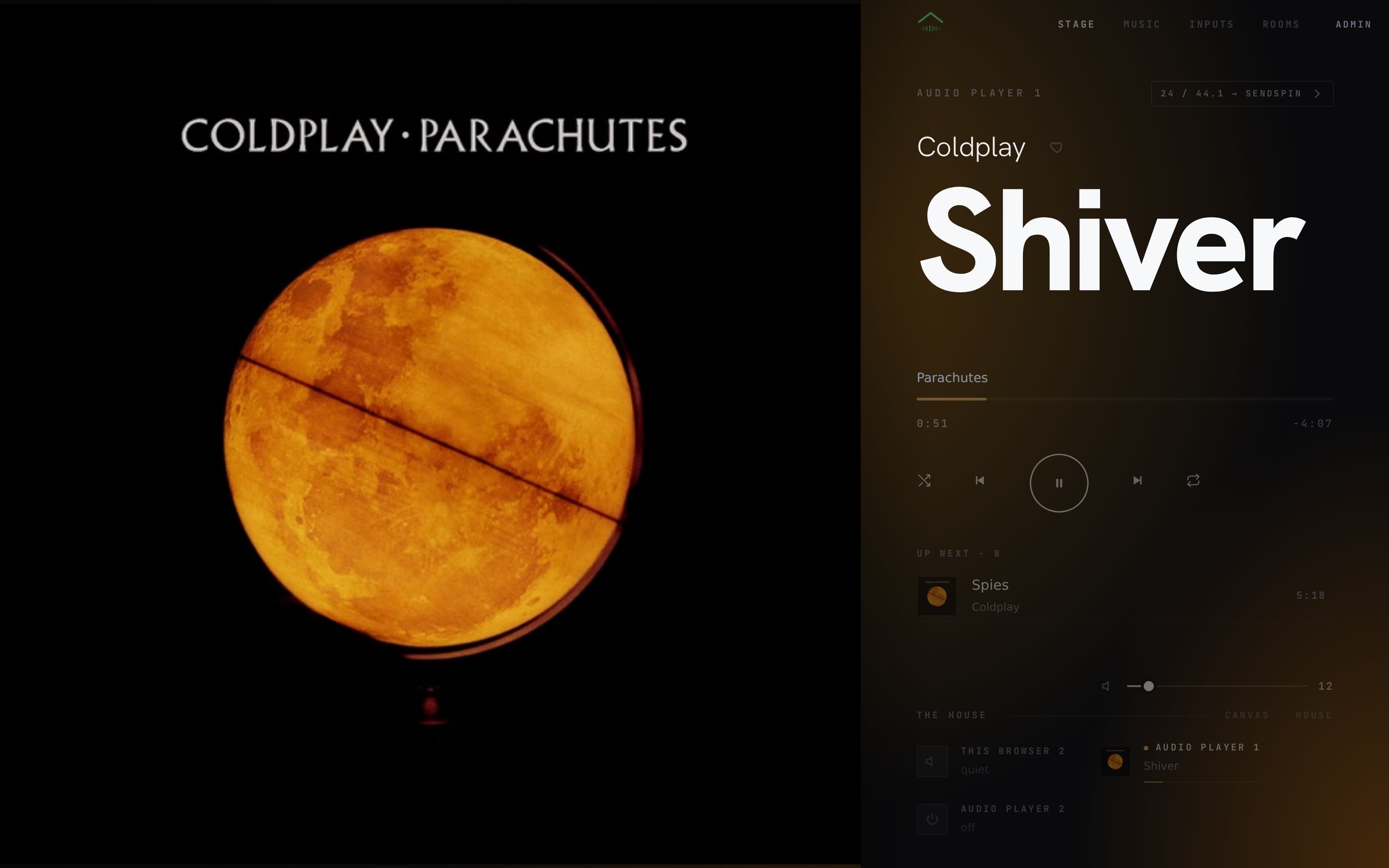
The server serves its own player — open :7090 on a phone, a laptop or the wall panel and every room is there. Nothing to install, nothing to update, and it can never be out of date: it comes from the same box that plays the music.

Search everything at once
One search across your library and every connected service, bucketed by kind. Find a track, tap it, and it plays in the room you have selected.
Favourites from any row
A star sits on everything that can play — browse results, search hits, queue entries, recents — and adds it to the zone's favourites: the same ones a Loxone wall switch or a Beoremote cycles through.
The queue, grouping and a 10-band EQ
Reorder what plays next, pull rooms into a group mid-song, shape a zone with its own equalizer — and see the true stream format of every room, down to the bit-perfect verdict.
Always in agreement
Two phones, the wall panel and the Loxone app all show the same state, live — nothing polls, and an edit made anywhere appears everywhere.
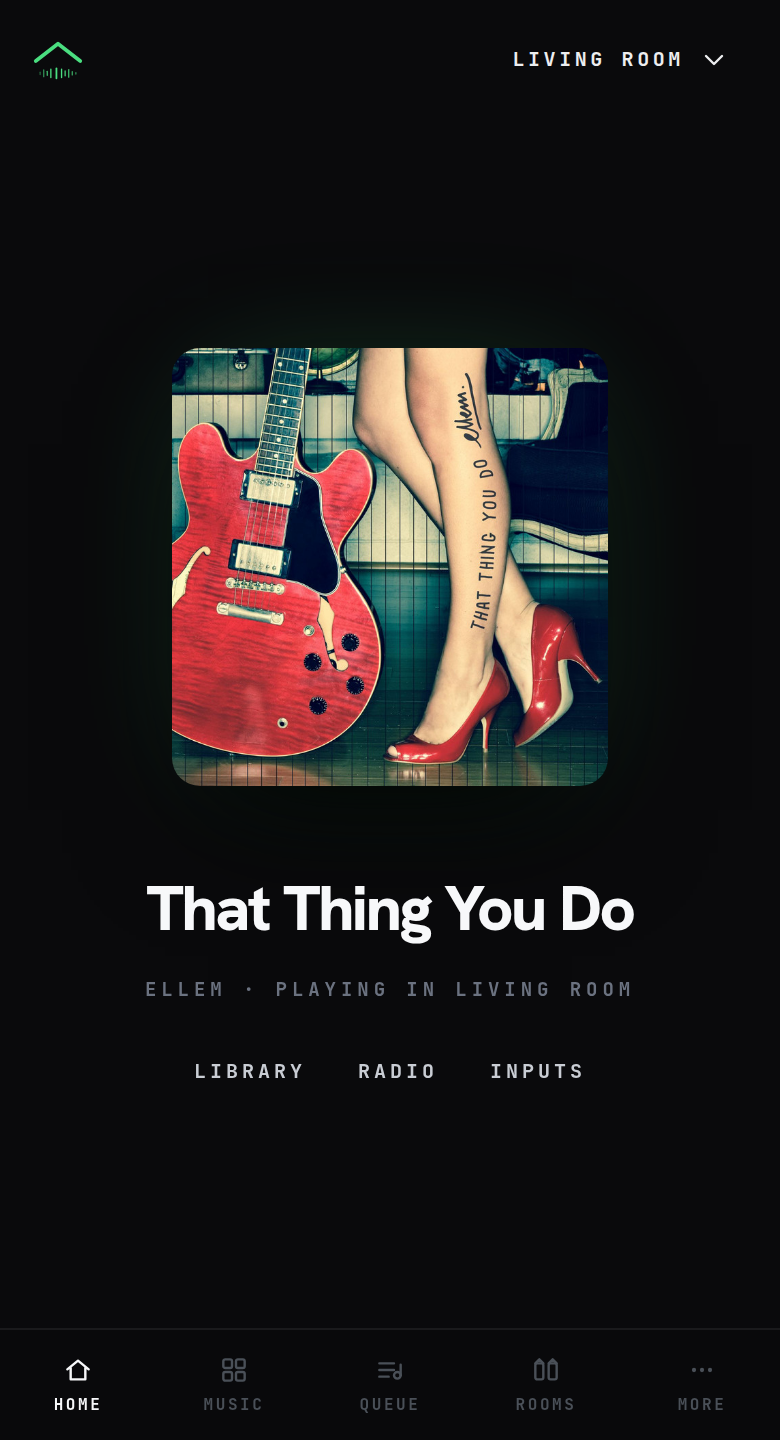
The sonn web player on a phone, playing That Thing You Do by Ellem in the living room
player · living room · :7090

zones & outputs

The speakers you already own are the system.

A zone is one device in one room. sonn speaks to nearly anything that can make sound — and a zone can also receive: point AirPlay or Spotify Connect at an old amplifier, and it just works.

bedroom idle · amp off study turntable · line-in bath airplay receiver living room sendspin · 24/96 kitchen chromecast grouped · in sync sonn core 24 zones max · :7090
one server in the basement, every room in sync
SP Sendspin
CC Chromecastgoogle & nest
SN Sonosspeakers & amps
AP AirPlayhomepod & avrs
DL DLNA / UPnPtvs & receivers
SC Snapcastraspberry pi
SQ Squeezelitesqueezebox
MA Music Assistantall its players
Receivers
A receiver lets a phone or app play to a zone: the stream lands on the server, which sends it on to that zone's output. A pair of Snapcast speakers on a Raspberry Pi shows up as an AirPlay target with no support of its own — and one zone can offer them all at once. spotify connect airplay dlna line-in music assistant
Grouping
Any rooms play in sync, regrouped on the fly. The kitchen joins the terrace for dinner and leaves again after — from the app, the wall panel, or a Loxone scene.
Power management
A zone can wake its amplifier before the first note and switch it off after the music stops — GPIO or USB relay, per zone or per shared amp group, with pre-delays and off-delays so short gaps never cycle the hardware.
This browser is a room
The web player registers itself as a local destination: select it and play, and it plays here — driven by exactly the same controls as the hardware zones.

beoremote one

Bidirectional control with the Beoremote One.

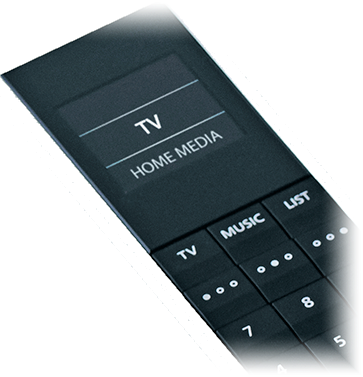
Radio stations and room favourites appear directly as playable items on the remote's screen — the server builds the list, the remote plays from it. Every coloured and dot button starts something in the room, and play, pause and skip route to whatever is playing, including a line-in device that can be driven.

Volume stays on the device itself, so it keeps working even when the server is briefly unreachable. The remote pairs over Bluetooth with a small helper that forwards its keypresses; once it runs, you only pick which remote belongs to which zone.

A Bang & Olufsen Beoremote One, close up: the display lists the sources
beoremote one — the list on it comes from the server
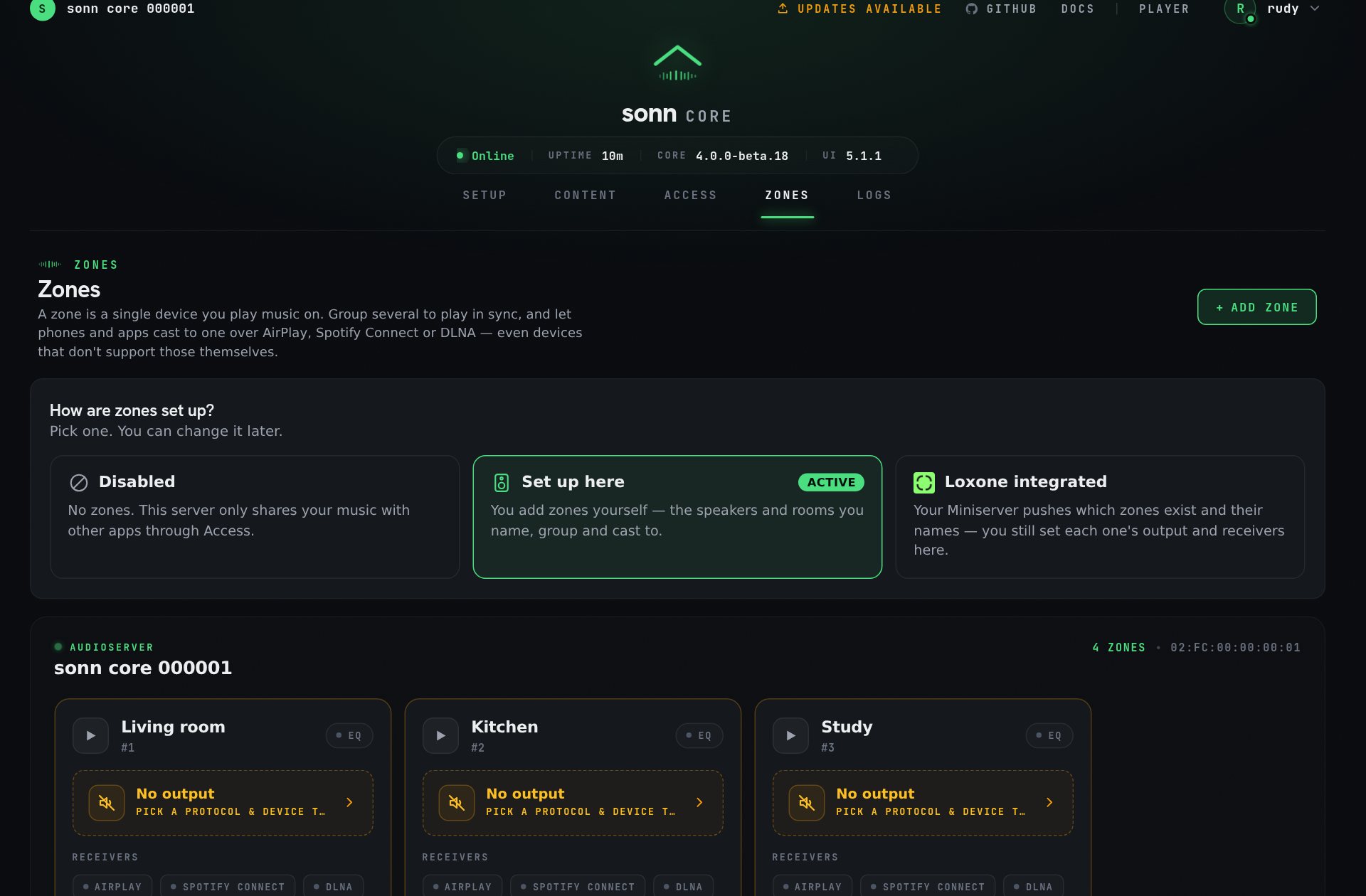
The sonn Admin UI Zones screen: four zones named Living room, Kitchen, Study and Bedroom, each with AirPlay, Spotify Connect and DLNA receiver chips
zones — one per room, receivers on every one

loxone

A drop-in Loxone Audio Server.

Not an add-on that talks to Loxone — a complete Audioserver implementation. Pair it with a Miniserver and it behaves like the real thing: zones, sources, favorites, alerts and the native Loxone app, with up to 24 zones — the same ceiling as the original.

  1. Choose Loxone integrated under Zones — the server starts listening immediately.
  2. Add the Audio Server in Loxone Config with the serial and host from the Admin UI.
  3. Deploy and reboot the Miniserver. The icon turns green, and your zones arrive.

Non-Spotify services are presented to the Miniserver as virtual Spotify accounts — the only vocabulary Loxone clients have for them. Everywhere else they keep their own name. Disconnecting takes effect without a restart, and your own zones return.

home assistant & your own tools

And it plays well with the rest of the house.

An optional MQTT surface publishes every zone as retained topics — whole objects as JSON, single fields as plain scalars — so Home Assistant, Node-RED or a KNX gateway consume it with no code at all. Control works the same way: publish a value, done.

# state, retained — connect late, see everything
sonn/zones/3                {"name":"Kitchen","state":"playing",…}
sonn/zones/3/state          playing
sonn/zones/3/track/title    Song

# control — a value, or a relative nudge
mosquitto_pub -t 'sonn/zones/3/set/volume' -m '+5'
mosquitto_pub -t 'sonn/zones/3/cmd' -m '{"power":"on","volume":40}'
A native Home Assistant integration is on the roadmap. Today, HA already talks to sonn over MQTT and the HTTP API — the native component will make it one-click.

for builders

An API where curl is a first-class client.

Commands are plain HTTP, and reading state never requires polling: subscribe to the event stream once and you are told about every change. No handshake, no correlation ids, no SDK to install — a five-line shell script is a complete integration.

# What is playing everywhere?
curl http://server:7090/api/v1/zones

{
  "id": 3,
  "name": "Kitchen",
  "state": "playing",
  "track": { "title": "Song", "artist": "Artist", "coverUrl": "…" },
  "output": { "protocol": "sendspin", "format": { "sampleRate": 192000, "bitDepth": 24 } }
}

Open by design

Apache-2.0, on GitHub. The public API is documented down to the field, and the web player is built on it and nothing else — if the contract can't carry a real player, that's a bug.

Events over polling

Two tabs, a wall panel and the Loxone app all agree, because everyone renders the same zone.changed. An edit made anywhere shows up everywhere, with no code of yours involved.

MQTT too

Same state, second surface: retained topics a Miniserver or KNX gateway can read without parsing JSON. Both run at once and cannot disagree — they publish from the same source.

get started

Running before the coffee is.

One container, host networking so it can discover your speakers, one folder that holds everything. Back up that folder and you have backed up the install.

quick start
# one file, one command — the compose file lives in the repo
curl -LO https://raw.githubusercontent.com/sonn-audio/core/main/docker-compose.yml
docker compose up -d

Then open http://<server-ip>:7090, create your admin account, and walk the three steps: Content — add your music. Access — switch on how to reach it. Zones — only if you want rooms. Steps one and two are already a working audio server.

port carries when
7090 Admin UI, web player, API, Subsonic, WebDAV, DLNA, audio streams always
7091 Loxone native app protocol loxone on
7095 Loxone Miniserver protocol loxone on
Prefer bare metal? It runs directly on Node.js 20+ — clone, npm install, npm run build, npm start.

open source · self-hosted · yours

Your music deserves a server this good.

No subscription, no cloud dependency, no speakers to replace. Everything runs on your own network — pull the internet cable, and your library keeps playing.